

Introduction
When systems grow, not every operation needs to happen synchronously.
Imagine a delivery management system. After a new delivery is created, the system may need to:
- Notify the courier
- Send a confirmation to the customer
- Update delivery statistics
- Notify another service
If all these operations happen synchronously, the original request needs to wait for every step to finish.
Another approach is to publish a message and allow other parts of the system to process it asynchronously.
This is one of the problems that message brokers help solve.
Among the available message brokers, one of the most popular is RabbitMQ.
Before working with RabbitMQ, it is important to understand its basic message flow and the responsibility of each component.
The basic RabbitMQ flow
A simplified RabbitMQ flow looks like this:
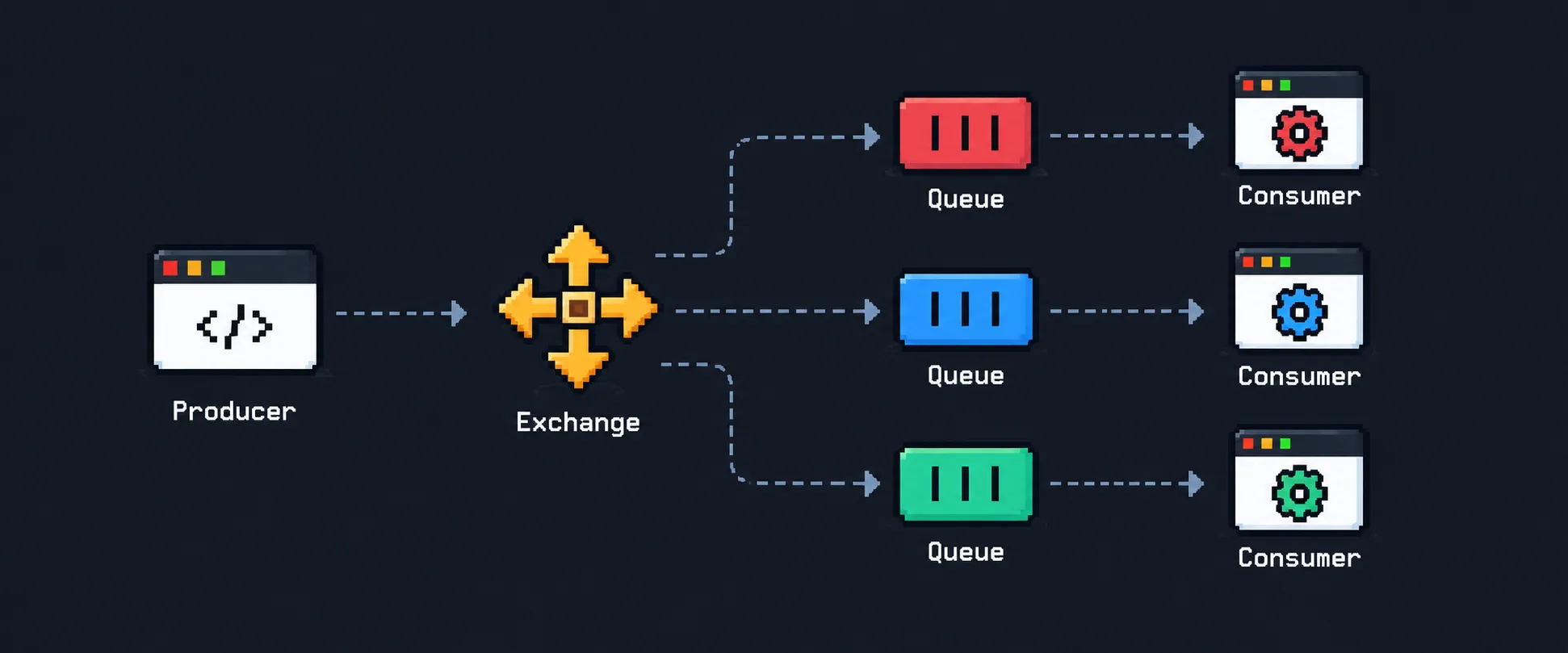
Each component has a specific responsibility:
- Producer: creates and publishes messages
- Exchange: receives messages and decides where they should go
- Queue: stores messages until they are consumed
- Consumer: receives and processes messages
There are also concepts such as Routing Keys and Bindings, which define how messages travel between exchanges and queues.
Let’s look at each concept individually.
Message
A Message is the data being transported through RabbitMQ.
For example, after creating a delivery, an application could publish the following message:
{
  "event": "delivery.created",
  "deliveryId": "delivery_123",
  "customerId": "customer_456",
  "courierId": "courier_789"
}
The content of the message depends entirely on the application.
RabbitMQ does not need to understand the business meaning of this data. Its responsibility is to transport the message between producers and consumers.
Producer
A Producer is the application or service responsible for creating and publishing messages.
For example, imagine a DeliveryService.
After creating a delivery, instead of directly calling a NotificationService, it can publish an event:
DeliveryService
      |
      | delivery.created
      ↓
   RabbitMQ
A simplified example using amqplib could look like this:
const message = {
  event: "delivery.created",
  deliveryId: "delivery_123",
  customerId: "customer_456",
  courierId: "courier_789",
};

channel.publish(
  "deliveries.exchange",
  "delivery.created",
  Buffer.from(JSON.stringify(message)),
);
The producer does not necessarily need to know which service will process the message.
Its responsibility is simply to publish it.
This helps reduce coupling between different parts of the system.
Exchange
An Exchange receives messages from producers and determines where those messages should be routed.
In RabbitMQ, producers commonly publish messages to exchanges rather than directly to queues.
Producer
   ↓
Exchange
   ↓
Queue
For example:
DeliveryService
      ↓
deliveries.exchange
      ↓
deliveries.created.queue
The exchange evaluates its routing configuration and decides which queue, or queues, should receive the message.
This routing behavior depends on concepts such as Routing Keys, Bindings, and the type of exchange being used.
Routing Key
A Routing Key is a value associated with a published message that can be used by an exchange when deciding how to route it.
For example:
delivery.createdWhen publishing a message, the producer can provide a routing key:
channel.publish(
  "deliveries.exchange",
  "delivery.created",
  Buffer.from(JSON.stringify(message)),
);
In this example:
Exchange:    deliveries.exchange
Routing Key: delivery.created
The routing key can be thought of as routing information attached to the publication.
Other examples could include:
delivery.created
delivery.assigned
delivery.picked_up
delivery.completed
delivery.cancelled
The exchange can use this information to determine which queues should receive each message, depending on its type and bindings.
Binding
A Binding defines a relationship between an exchange and a queue.
It tells RabbitMQ how a queue is connected to an exchange.
For example:
deliveries.exchange
        |
        | delivery.created
        ↓
deliveries.created.queue
A binding can be created like this:
await channel.bindQueue(
  "deliveries.created.queue",
  "deliveries.exchange",
  "delivery.created",
);
Here we have:
Queue:       deliveries.created.queue
Exchange:    deliveries.exchange
Binding Key: delivery.created
If a compatible exchange receives a message with the routing key:
delivery.createdthe message can be routed to:
deliveries.created.queueIt is important to distinguish these two concepts:
Routing Key: routing information provided when the message is published.
Binding: relationship between an exchange and a queue, optionally using a binding key as part of the routing rule.
The exact way these values are interpreted depends on the exchange type.
Queue
A Queue stores messages until they can be processed by consumers.
The flow now looks like this:
Producer
   ↓
Exchange
   ↓
Queue
   ↓
Consumer
For example:
DeliveryService
      ↓
deliveries.exchange
      ↓
deliveries.created.queue
If a consumer is temporarily unavailable, messages can remain in the queue until they are consumed, depending on the queue and message configuration.
This creates a separation between the service producing the message and the service processing it.
The DeliveryService can focus on creating the delivery and publishing the event, while other services process the resulting operations independently.
Consumer
A Consumer is the application or service responsible for receiving and processing messages from a queue.
Imagine a NotificationService listening to deliveries.created.queue:
deliveries.created.queue
          ↓
  NotificationService
Whenever a new delivery is created, the consumer receives the message and can notify the courier.
For example:
channel.consume("deliveries.created.queue", async (message) => {
  if (!message) return;

  const data = JSON.parse(message.content.toString());

  await notifyCourier(data.courierId, data.deliveryId);

  channel.ack(message);
});
In this example, the consumer:
- Receives the message
- Reads its content
- Notifies the courier
- Acknowledges the message
The acknowledgment tells RabbitMQ whether the message was successfully processed.
ACK
Means Acknowledgment. It tells RabbitMQ that the consumer successfully processed the message.
RabbitMQ
   |
   | delivery.created
   ↓
NotificationService
   |
   | ACK
   ↓
RabbitMQ
In amqplib, this can be done with:
channel.ack(message);Conceptually, the consumer is saying:
“I successfully processed this message.”
RabbitMQ can then remove the acknowledged message from the queue.
NACK
Means Negative Acknowledgment. It indicates that the consumer was unable to successfully process the message.
RabbitMQ
   |
   | delivery.created
   ↓
NotificationService
   |
   | NACK
   ↓
RabbitMQ
For example:
channel.nack(message);Conceptually:
“I could not process this message.”
RabbitMQ can then decide what happens to the message based on the provided configuration.
For example, the message can be returned to the queue:
channel.nack(message, false, true);The last argument indicates that the message should be requeued.
It is also possible to reject the message without requeuing it:
channel.nack(message, false, false);This becomes especially important when implementing retry strategies and Dead Letter Queues, preventing messages that repeatedly fail from being processed forever.
Conclusion
RabbitMQ introduces several concepts, but each one has a clear responsibility within the message flow:
Producer → Exchange → Queue → ConsumerThe Producer publishes a message, the Exchange determines where it should go, the Queue stores it until it can be processed, and the Consumer handles the message.
Concepts such as Routing Keys and Bindings define how messages are routed between exchanges and queues, while ACK and NACK allow consumers to communicate whether a message was successfully processed.
Understanding these responsibilities individually makes the overall RabbitMQ flow much easier to reason about.
From this foundation, it becomes easier to explore more advanced concepts such as Exchange Types, Dead Letter Queues, Retries, Message Durability, Prefetch, and Competing Consumers.